
Data Loss in Nepal: The Preventable Disaster Killing Small Businesses (And a 3-Step Backup Plan)
Power outages, hardware failure, and ransomware are everyday realities for Nepali businesses — yet most operate without a proper backup strategy. This practical...
Power outages, hardware failure, and ransomware are everyday realities for Nepali businesses — yet most operate without a proper backup strategy. This practical guide outlines a simple 3-step data protection plan (local + cloud + tested recovery) that any business can implement this week, regardless of technical expertise.
The day a business lost everything
In the spring of 2022, a small accounting firm in Patan had their office broken into overnight. The thieves took three laptops. On those laptops — with no cloud backup, no external drives, no redundancy of any kind — were seven years of client records, tax filings, invoices, and correspondence. There was no recovery. The firm lost a third of their clients in the months that followed and spent over NPR 600,000 in legal and recovery efforts that ultimately went nowhere. The laptops were never found.
This is an extreme example, but it illustrates something that IT professionals see in a softer, slower form all the time: businesses operating with no meaningful data backup strategy until something goes wrong. And by then, of course, it\'s too late. This post is about making sure that\'s never your story.
The real data threats facing Nepali businesses
Most business owners think of data loss as something dramatic — fire, flood, theft. Those risks are real, but they\'re not the most common sources of data loss. According to a 2023 report by the global data protection firm Veeam, the top causes of data loss for small and mid-sized businesses are:
- Accidental deletion by an employee (27% of incidents)
- Hardware failure — hard drives, SSDs, and servers all have a finite lifespan (23%)
- Ransomware and malware attacks (19%)
- Power surges and outages causing corruption (14%)
- Physical theft or damage (10%)
In Nepal\'s context, that fourth item deserves particular emphasis. Load shedding has improved dramatically since the dark days of 16-hour cuts, but power quality — sudden cuts, surges, brownouts — remains inconsistent across many parts of the country. An unclean power cut while a database is writing to disk can corrupt files in ways that are catastrophic and silent.
Ransomware: the threat that has arrived in Nepal
Ransomware — malicious software that encrypts all of your files and demands payment for the decryption key — is no longer just a problem for large companies in rich countries. Nepal\'s Computer Emergency Response Team (CERT-NP) reported a significant uptick in ransomware incidents affecting Nepali businesses and organisations from 2022 onwards. Several hospitals, financial institutions, and government offices have been targeted.
The typical ransomware attack in Nepal follows a familiar path: a staff member opens a malicious email attachment or visits a compromised website. The software spreads silently across the network, encrypting files as it goes. The business wakes up to a screen demanding payment in cryptocurrency. Without a clean backup, the options are grim: pay (with no guarantee of decryption), attempt costly recovery (with low success rates), or lose the data.
The 3-step backup plan any business can implement
Step 1: The 3-2-1 rule — understand it, apply it
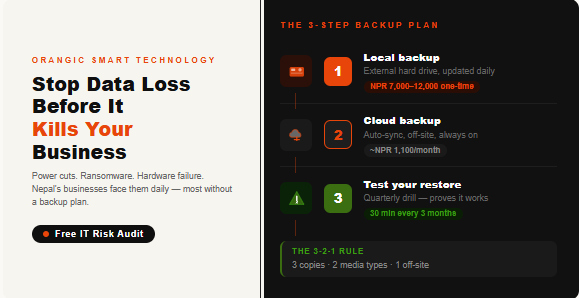
The gold standard in data backup is the 3-2-1 rule: keep at least 3 copies of your data, on 2 different types of storage media, with 1 copy stored off-site. In practical terms for a small Nepali business, that means: your working files on your computer (copy 1), a regular backup to an external hard drive in your office (copy 2), and an automated backup to a cloud service like Google Drive, Dropbox, or a dedicated backup tool (copy 3, off-site).
If the ransomware gets your computer and your office drive, the cloud copy is clean. If the office floods, the cloud copy is clean. If someone breaks in and takes the laptop and the drive, the cloud copy is clean. The whole point of redundancy is that no single bad event can take everything.
Step 2: Automate everything — human memory is not a backup strategy
Backups that depend on someone remembering to do them fail. A study by the disaster recovery firm Unitrends found that manual backup processes fail completely within 18 months in over 65% of small businesses — not because of bad intentions, but because life gets busy and the backup that \'someone will do on Friday\' stops happening. The only reliable backup is one that runs itself.
Set your cloud backup to sync automatically — Google Drive\'s desktop app, Dropbox, OneDrive, or a dedicated backup service like Backblaze (which costs around $9 USD per month for unlimited backup of one computer) all offer automatic, continuous backup. Set your external drive to back up using Windows Backup or Time Machine (Mac) on a daily schedule. Then forget about it — until the day you need it.
Step 3: Test your backup — a backup you\'ve never tested is not a backup
This is the step almost everyone skips. Once a quarter, pick one important file or folder and deliberately restore it from your backup. Not because you need it — because you need to know the process works before you\'re in an emergency. Many businesses have discovered in a crisis that their backup was running but was corrupting files silently, or that their cloud sync had stopped months earlier after a password change.
Schedule a 30-minute \'backup test\' in your calendar four times a year. Treat it like a fire drill. It will give you peace of mind that is absolutely worth the time.
A backup you\'ve never tested is a hope, not a plan. Test it before you need it.
What does a solid backup setup cost?
For most small businesses, a comprehensive backup setup costs very little:
- A good 2TB external hard drive: approximately NPR 7,000 to NPR 12,000 (one-time)
- Google Drive (2TB plan): approximately NPR 1,100 per month or NPR 11,000 per year
- Backblaze unlimited computer backup: approximately NPR 1,200 per month
Total annual cost for solid, automated, tested backup protection: roughly NPR 15,000 to NPR 25,000. The cost of losing years of business data? Ask the accounting firm in Patan that started this post.
One more thing: your email and accounts
Files aren\'t the only thing worth protecting. Your email history, your Google or Microsoft account, your domain name registration, your website hosting login — these are all \'data\' in a broader sense, and losing access to them can be equally devastating. Use a password manager, enable two-factor authentication on every critical account, and make sure more than one person in your business knows how to access essential systems in an emergency.
Worried your business isn\'t adequately protected? Contact the Orangic Smart Technology IT support team for a free data risk assessment. We\'ll identify your vulnerabilities and recommend a protection plan that fits your budget. Reach us by phone, email, or the contact form on our website.

_1777367224.png)